


Invoice Maker - Simple Invoice
4.744.00 Reviews
App Specs
- Version
- 10.11.04
- Updated On
- License
- Free
- Downloads
- 500,000+
- Developer
- Smart & Simple Invoice Maker 3A
- Categories
- Business
- Platform
- Android
Screenshots
 Analysis by AppCompare
For a small business, invoicing is rarely difficult in theory; it’s the repeated little tasks that eat into the day. I want to record what I did, work out what a customer owes, and send a clear bill without opening a laptop or rebuilding the same details each time. Invoice Maker - Simple Invoice is aimed at that everyday workload. It is a business app from Smart & Simple Invoice Maker 3A, and its appeal is convenience: keeping basic billing and expense work close at hand.
First Impressions and User Interface
When you first launch Invoice Maker - Simple Invoice, you're greeted with a clean and straightforward interface. It’s like a breath of fresh air compared to some of the overly complicated apps out there. The design is intuitive, making it easy to navigate even if you’re not a tech wizard. Everything is laid out with the user in mind, from the large buttons to the straightforward navigation menu.
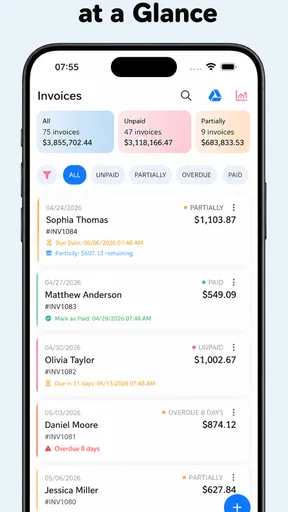
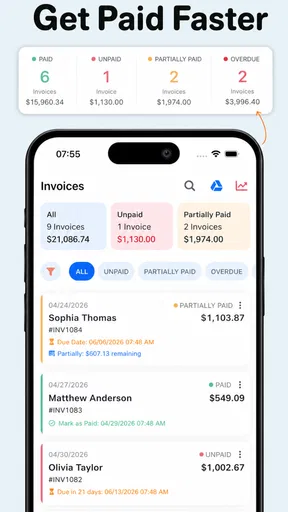
The dashboard gives you a quick overview of your invoices, expenses, and clients. Right off the bat, it feels like the developers have put a lot of thought into keeping things simple and accessible. No one wants to spend hours figuring out how to send an invoice, right?
Creating Invoices
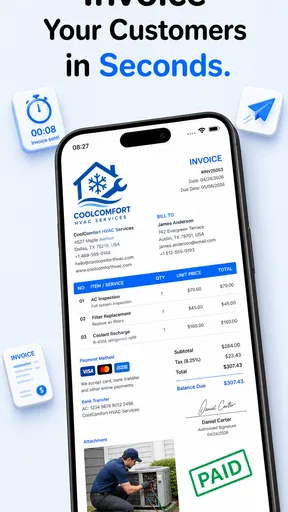
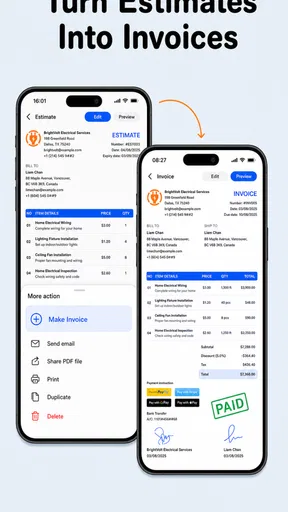
Now, this is where the magic happens. Creating an invoice is a breeze. You just tap on the "Create Invoice" button, and you're off to the races. The app guides you through the process step by step. You can add your business details, client information, and line items with just a few taps. Need to add taxes or discounts? No problem, there are options for that too.
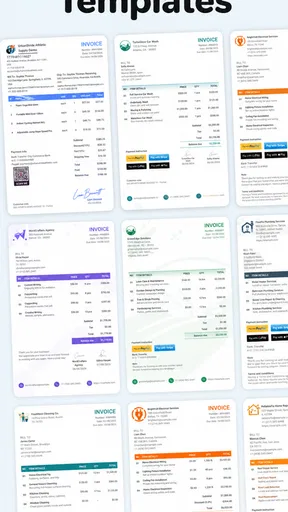
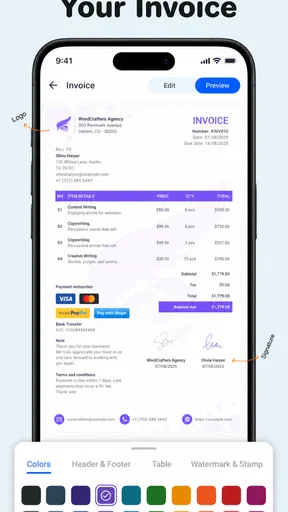
One of my favorite features is the ability to customize your invoices. You can add your logo, choose a color scheme that matches your brand, and even include personalized notes. It's these little touches that can make a big difference, especially when you're trying to make a professional impression.
Tracking Expenses
Keeping track of expenses is another area where this app shines. You can log expenses as they occur, snapping a photo of the receipt and entering the details right from your phone. It’s like having a mini accountant in your pocket. The app categorizes and organizes everything, making it easy to pull up reports when tax time rolls around.
Plus, you can sync all this data to the cloud, ensuring that you never lose track of an expense, even if you switch devices. It's these kinds of features that make managing finances a whole lot less stressful.
Worth Reading Before You Choose

EA SPORTS FC Mobile 26 Is a Bigger Football Game, but It Takes Time

Flipboard Shows What News Apps Must Do Beyond the Feed

Switching to Android Auto Means Rethinking Your Driving Routine

Google Calendar Makes a Crowded Week Easier to Manage

Ludo King Makes the Most of the Minutes Between Plans

Baby Panda World Brings Quick Play to Modern Phones, but Its Game Library Feels Busy
Client Management and Reports
Managing clients is also a breeze with this app. You can add new clients on the fly and store their contact information for easy access. The app keeps track of all communications and invoices, so you always know where you stand with each client.
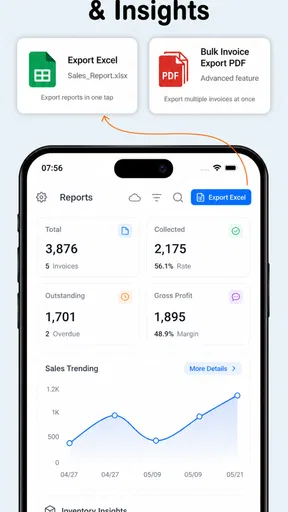
And let's not forget about the reports. With just a few taps, you can generate detailed reports that show you exactly where your money is coming from and where it's going. These reports are not only handy for keeping tabs on your business but also essential when it's time to file taxes or apply for a loan.
Integration and Support
Another standout aspect of Invoice Maker - Simple Invoice is its integration capabilities. It syncs seamlessly with popular accounting software, making it easy to import and export data. If you’re already using tools like QuickBooks or Xero, you’ll appreciate how smoothly this app fits into your existing workflow.
And if you ever run into any hiccups, the support team is just a click away. The app offers a comprehensive help section, and you can contact support directly from within the app. It's like having a lifeline at your fingertips.
A Practical Routine for Busy Days
The most useful way to approach a mobile invoicing tool is to treat it as part of the job, not as an end-of-month cleanup project. For example, after finishing a repair or a design session, I would enter the customer and the work while the details are still fresh, then check the line items before sending anything. That small habit matters: a phone is handy at the point of service, but it is also easy to mistype a quantity or leave out a detail when rushing between appointments.
For repeat customers, keeping their contact details available can save the annoying step of searching old messages. I’d still review the recipient and description every time, especially when two jobs have similar names. Reusing familiar information is a time-saver only if it doesn’t turn into sending yesterday’s work to today’s client.
Receipt capture has a similarly practical use. I’d photograph a receipt immediately after buying supplies, then add a short, meaningful description rather than relying on a vague category alone. A picture can help jog my memory later, but it should not replace checking that the amount and purpose are recorded correctly. That is a useful distinction for anyone hoping to make tax preparation easier: organized records reduce hunting, but they do not remove the need to verify them.
Where a Mobile Invoice Maker Fits
Compared with a spreadsheet, a dedicated invoice app can make it easier to keep customer details and billing documents together instead of copying information from one file to another. Compared with full accounting software, a phone-first invoice maker is more approachable for someone who mainly needs to bill clients and note routine expenses. The trade-off is that a focused app may not replace the broader bookkeeping, payroll, inventory, or compliance tools a growing company needs.
I’d consider it for a freelancer, tradesperson, tutor, or other solo operator who sends straightforward bills and wants to record expenses while away from a desk. It is less compelling for a team that needs several staff members to coordinate approvals, or for a business with complicated tax rules and a detailed accounting process. In those cases, a spreadsheet may still suit a very simple operation, while established accounting software is the better home for connected business records.
One tip is to decide on a consistent naming style for services and expenses before building up a long history. Clear descriptions make later searches and reports more useful; a string of entries called “work” or “supplies” tells me very little when I revisit it weeks later. I’d also review a sample invoice before relying on it with an important client, checking the business identity, client details, totals, and note for mistakes. That quick check protects the professional impression that customization is meant to create.
Cost, Compatibility, and Limits
The app is free to install, with in-app purchases ranging from $4.99 to $134.99 per item, so I would check the available options in the app before building a workflow around a feature I may need. The free starting point makes it approachable, but it does not mean every capability or usage pattern will be free. Anyone comparing it with a spreadsheet should weigh the value of an organized mobile workflow against the possibility of paid options.
It is rated for Everyone, has a 4.7 average from around 4.7 thousand ratings, and has over 500 thousand installs. It was released on May 31, 2023; version 10.11.04 requires Android 9 or later. Those details make it a realistic option for many Android users, though a business should still test its own routine rather than assume that a popular app automatically fits its bookkeeping needs.
The bigger limitation is one of scope. Invoicing and expense tracking can make everyday administration less scattered, but they are not a substitute for reviewing cash flow, checking whether bills have been paid, or maintaining records that meet a business’s obligations. I would use the reports as a convenient overview and verify important figures in the bookkeeping process I rely on. If several people need shared access or the business has complex financial workflows, I’d look for a more comprehensive system instead.
Who Will Get the Most from It?
For someone who sends occasional estimates or invoices, adds a logo, and wants to keep client and expense details in one place, the main benefit is less context-switching. It can turn a job completed away from the office into a recordable task before the details fade. That is a modest but genuine improvement, particularly for people who otherwise postpone paperwork until it piles up.
On the other hand, people who only create a bill once in a while may find a document template perfectly adequate. A business already committed to an accounting platform should also think carefully before keeping the same information in two places; duplicate entry can create more confusion than it removes. I would choose one main record-keeping routine and use this app only if it clearly makes that routine faster.
So, if you're in the market for a user-friendly, feature-rich invoicing app, Invoice Maker - Simple Invoice is definitely worth checking out. It's designed with the everyday user in mind, offering simplicity without sacrificing functionality. Whether you're a freelancer, a small business owner, or just someone who likes to keep things organized, this app will make your life a whole lot easier.
Ready to take control of your invoicing? You can download Invoice Maker - Simple Invoice from the App Store or Google Play and see for yourself how it can streamline your business operations.
Pros
- User-friendly interface for quick navigation.
- Customizable templates for personal branding.
- Supports multiple currencies and languages.
- Easy invoice tracking with status updates.
- Integration with various payment gateways.
Cons
- Limited free version features available.
- No offline mode for invoice creation.
- Occasional syncing issues reported.
- Lacks advanced reporting tools.
- Customer support response can be slow.
FAQs for Invoice Maker - Simple Invoice
What features does Invoice Maker - Simple Invoice offer?
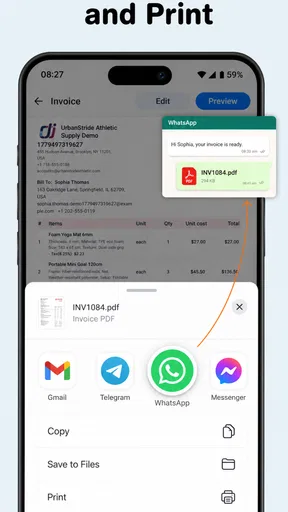
Invoice Maker - Simple Invoice provides a range of features designed to streamline your invoicing process. It allows users to create professional invoices quickly, customize templates, and manage client information. Additionally, the app supports multiple currencies, tax calculations, and export options for easy record-keeping and sharing with clients.
Is Invoice Maker - Simple Invoice suitable for small businesses?
Yes, Invoice Maker - Simple Invoice is ideal for small businesses and freelancers looking for an efficient way to manage their invoicing needs. The app's user-friendly interface and customizable features make it easy to create and send invoices, track payments, and manage client information without requiring extensive accounting knowledge.
Does Invoice Maker - Simple Invoice support multiple currencies?
Invoice Maker - Simple Invoice indeed supports multiple currencies, making it perfect for businesses that deal with international clients. Users can easily switch between currencies when creating invoices, ensuring accurate billing and seamless transactions across different countries, enhancing the app's versatility for global business operations.
How secure is the data in Invoice Maker - Simple Invoice?
Security is a priority for Invoice Maker - Simple Invoice. The app employs robust encryption protocols to protect user data, ensuring that sensitive information such as client details and financial records are kept secure. Regular updates and security patches further ensure that the app remains safe from potential vulnerabilities.
Can I customize the invoice templates in Invoice Maker - Simple Invoice?
Yes, customization is a key feature of Invoice Maker - Simple Invoice. Users can personalize invoice templates to match their brand identity by adjusting colors, fonts, and adding their business logo. This flexibility allows users to maintain a professional appearance in all their client communications, enhancing brand consistency.


